I think our ninth graders doing research on African masks are going to love using the new "Explore" option in Google Docs. Adding images will be such a breeze!
The pluses of using Explore to find images?
No need to open another window.
All images in Explore are copyright-friendly.
Attribution is automatically added to the image.
Check out this short slide tutorial to start exploring right now.
Save yourself a few steps, and some money! That book you want to purchase on Amazon or Goodreads? It might be available to borrow from your local library! Chrome's "Library Extension" lets you check your local library immediately, while you're in Amazon or Goodreads. [Note: As of this publication date, also available at Barnes and Noble, AR BookFinder, and Google Books! ] How cool is that?! I made this mini slide tutorial to demonstrate how the extension works.
To enlarge: hover over image->Ctrl-click (Mac) or right click (pc)->Open image in new tab.
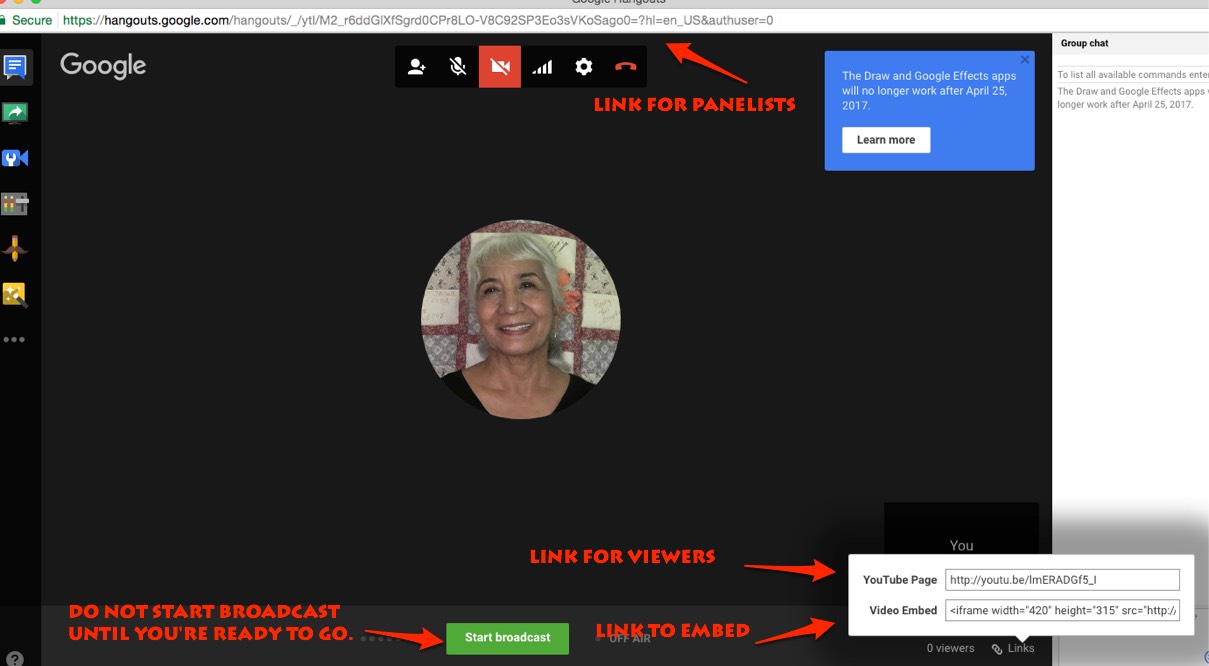
Hangouts on Air are now only possible using YouTube.
Here's a 5-step guide, no extras needed. The location of the 3 links to share (for panelists, for YouTube viewers, and for embedding on a website) are on Slide 6 (and above).
The amount of professional development the Team continually provides throughout the year to educators around the world is staggering, as evidenced by the interactive map on the EdTechTeam Events page.
And there's something for everyone at these events: from newbie to geek.
Because I can't make all of the Google Summits due to time, budget, and travel issues (and other priorities such as family), I love that the EdTech Team makes Summit presentations available publicly, long after the event!
Here's a 4-minute YouTube demo for finding past Google Summit presentations, both on the Web and on your mobile device:
Thanks to the EdTech Team for sharing resources for all of us to enjoy, long after the Summit is over.