Showing posts with label #edtech. Show all posts

Four #GR8Finds #ThisWeek - Maker & DIY Programs, Social & Emotional Learning, Why EdTech?

Happy Valentine's Day!
[I blog every Friday about my #GR8Finds #ThisWeek. My list is very v-e-r-r-r-y selective
--my own crème de la crème curation. Generally, three to five 
#GR8Finds
.]

February 13


1. Maker and DIY programs - A great editable list from +YALSA.

Love this crowd-sourced resource❣ (Not just for libraries.)

2. A Parent's Resource Guide to Social and Emotional Learning. A magnificent list, updated just in time for Valentine's Day, by +Edutopia.


Resources by Topic:


I'm keen to learn how to combat bullying and build empathy.

3. 50 Ways EdTech Benefits Teachers and Students 

Thought-provoking compilation by +Tom Vander Ark.


This article pairs nicely with 4. What question(s) do you ask yourself before integrating technology into instruction? by +Matt Renwick.


Bottom line = Always ask "Why?"


Winterim Week at our school went well! Ate my way through our Middle School Cooking program. ... Pass the salad, please.☺


(◕‿◕✿)
about.me
[Subscribe]


What makes a good #EdTech leader? -- An Open Invitation to School Principals and other Administrators to Respond


Dear School Principals and other Administrators,

What makes a good #Edtech leader?

Administrators as #EdTech leaders will be the topic of our monthly #edchathi (Ed Chat Hawaii) Twitter chat, December 1, at 6:00 pm HST (11:00PM EST).

We hope principals and other administrators who are leading the technological shift in their schools and beyond will join us!

Special invitations go out to:

• The Connected Principals, with a shared Twitter profile: @conprin

• Members of the Connected Principals' Twitter admins list: https://twitter.com/chrislehmann/lists/admins

• +Eric Sheninger, who presented in Hawaii in July while on vacation, and who we discussed in a Google+ hangout for Hawaii educators.

We've already personally invited several other administrators, but we know there are more out there. Please let us know who you are!

◊ ◊ ◊ ◊ ◊

If you can't make the middle-of-the-Pacific dinner-time-for-us #edchathi chat, we would love to learn from you on your own time, preferably before the chat, but afterwards would be fine too.

Please use this Google form to contribute:


You can view the responses as a summary, spreadsheet and a doc. (Go ahead and break the ice. Be the first to respond :D)
We'll include your opinions in our live Twitter chat (Dec 1, 6PM HST) and we'll check back afterwards, for further study of Administrators as EdTech Leaders. An archive of the Twitter chat will be available on the #edchathi website.
◊ ◊ ◊ ◊ ◊

Our Google form is a grand experiment, to extend the conversation beyond the confines of our all-too-brief one-hour Twitter chat. We hope you'll share your insight with us!
On behalf of the #edchatHI crew,
THANK YOU very much!
Sincerely,
Linda Lindsay
(◕‿◕✿)

5 Tech Tools, Innumerable Possibilities -- from the Hawaii #GafeSummit


Five tech tools -- innumerable possibilities.

I think our teachers and students will absolutely love these tech tools!

I learned about them at the Hawaii #gafesummit, which was a delightfully surprising experience.

Have you had any experience with these tools?


1. PearDeck

I learned about this very promising now-in-private-beta tool from +Chris Bell's demo slam.

PearDeck is "an interactive presentation system for active classrooms". It's made especially for 1:1 Chromebook classrooms.

It's a start-up by 3 Iowa City teachers whose web-based gradebook ActiveGrade, LLC, was acquired by Haiku Learning. A talented trio indeed!

According to the web site, "Pear Deck makes it easy to plan and build interactive lessons directly from your Google Drive that promote active learning in the classroom. As students interact with the lesson, real-time data provides instructors the feedback they need to adapt teaching on-the-fly."

This video gives a nice overview of the product.
.


Here's a review: ActiveGrade founders create new education startup Pear Deck, Silicon Prairie News, March 3, 2014.

I installed the Pear Deck Beta Preview app and since PearDeck is not yet available, I applied to join the Beta ASAP. :)


I hope to hear from PearDeck soon!

2. Photo Sphere

I learned about Photo Sphere for Google Maps 'Up, down, and all around. Immersive 360º views', from Googler +Evan Rapoport. Photo Sphere is an Android camera app. (Hopefully an iOS version will be available soon.) 

You can explore the gorgeous photospheres in Google Maps | Views and also join the Google Maps View G+ community. The official hashtag throughout the social networks is #photosphere. Check out this 360º photo of Kula, Maui, by Ed White. So peaceful.


Photo Sphere would be perfect for any place-based student project, as would Tour Builder and Google Map Engine.


3. Tour Builder

Tour Builder, also in Google Maps, is a browser-based tool to 'put your story on the map'. This would be an engaging way for our students to document and share their Maui field trips, as +Pete Hansen and his seventh graders have done with Waihe'e Ridge Hike. Great photos!

Tour Builder looks simple to use and is recommended by Google Lit Trips founder Jerome Burg.


4.  Google Maps Engine

I was blown away by +Molly Schroeder's "Pack Your Bags" Demo Slam. She had asked participants to fill out a Google Form describing their favorite vacation spot.

Molly compiled the data into a map, using Google Maps Engine. Impressive!
Molly describes the process of importing data into Google Maps Engine, in this tutorial.


Google Maps Engine is a fantastic tool for making all kinds of crowdsourcing comparisons, across the curriculum and across the globe. So powerful!


5. Eye-Fi


Eye-Fi for Android is an SD card for instantaneous wireless transfer of photos. The card creates its own WiFi signal!

I first heard about Eye-Fi via  +Veronica Partida's tweet during the Summit.


Then coincidentally, +Chad Nacapuy described Eye-Fi in detail in our weekly Google Rocks! Hawaii hangout. Bonus: +Michelle Carlson Colte and +Sean Connors chimed in with how they would use Eye-Fi in their classrooms. Check it out:


Eye-Fi would be fantastic for our students' photo projects, again, across the curriculum. What a timesaver!


Yes, 5 tech tools, innumerable possibilities.

... Google is so bright, I gotta wear shades. :)


(◕‿◕✿)


Reflecting on 2013: The Reasons I Blog, and My Top 10 Posts


I get asked this question all of the time. Why do you blog?

I enjoy it! That's the #1 reason.

I like documenting and reflecting on what I learn, for future reference. My memory bank is sometimes unreliable. That's #2.

I like sharing what I learn with others who might benefit. #3.

We librarians teach and thrive in an open environment. Now that open environment is a whole lot bigger, and so are the rewards.

◊ ◊ ◊ ◊ ◊

I'm sharing my top 10 (of 54) blog posts for 2013 in the hope that more educators in the Internetverse will find something they can use.


(in chronological order)

Google+ Tip: How to Adjust the Flow of Information from your Circles -- A Snapshot


5 Scholarly Science Search Engines for the College Student's Toolbox

Innovative Chromebook Teachers in Math, Science, Social Studies and Foreign Language, Special Education, Language Arts - EducationOnAir - All in One Place

This "Libraries of the Future" Infographic Nails it!

My 10 Favorite Google Tips of the 100 Shared by @EdReach

Use this Google Custom Search Engine to Search Through 40 Sources for Curated Educational Videos

Resources for Learning about COPPA's (Children's Online Privacy Protection Act) New Rules

School Libraries as Maker Spaces -- A Few Resources to √ Out

Plussers that Pin and Vice Versa, shared by Peg Fitzpatrick

◊ ◊ ◊ ◊ ◊

My blog post goal for 2014? 100 quality posts.

I think I can do it!

(◕‿◕✿)


Takeaways from #tlchat #sschat combo convo "Student Collaboration, Research Skills and Tech Integration"


Yes, this was a very special collaboration indeed, between #TLChat and #SSChat (teacher-librarians and social studies teachers).

My main takeaway too-good-not-to-share from TLChat's Virtual Cafe's "Student Collaboration, Research Skills, and Tech Integration" was presenter Ron Peck's slideshare. Thanks, Ron!


Due to technical problems, I didn't get on until the Cafe was over half over. But these links mentioned are the ones that I'm definitely going to check out:
Celly @ school - "a platform of tools that enhances school communication" - Text reminders, study groups, field trips, SMS polling, clicker 
Nikki Robertson's Pinterest board: Social Studies Sites 
The Library of Congress Veterans History Project 
World War Two Global Connections Project
Melissa Seideman's Not Another History Teacher blog 
Thanks to The Daring Librarian Gwyneth Jones for her leadership in setting up this great collaboration!

[Check out the archives of the event here.]

(◕‿◕✿)
@mauilibrarian2


Four Ways to Keep Track of Who Uses eReaders


Interested in who uses eReaders? Here are four ways to keep track:

1.  Read reports and surveys of research organizations.

Check out these reports from Pew Research

Here's a Harris Poll of 2,056 adults: No Surprise, eReader Use Continues to Grow.

If you're really serious about knowing about the status of the ereader industry, you can fork over $4500.00 (!) for International Data Corporation's Worldwide and U. S. eReader 2012-2016 Forecast which covers statistics for Amazon, Barnes and Noble, Kobo Inc., Pandigital Inc., and Sony.

If you want to pay less ($635.00) check out the eBooks and eReaders: 2012 report by Research and Markets.
◊ ◊ ◊ ◊ ◊

2. Look for infographics on the subject.

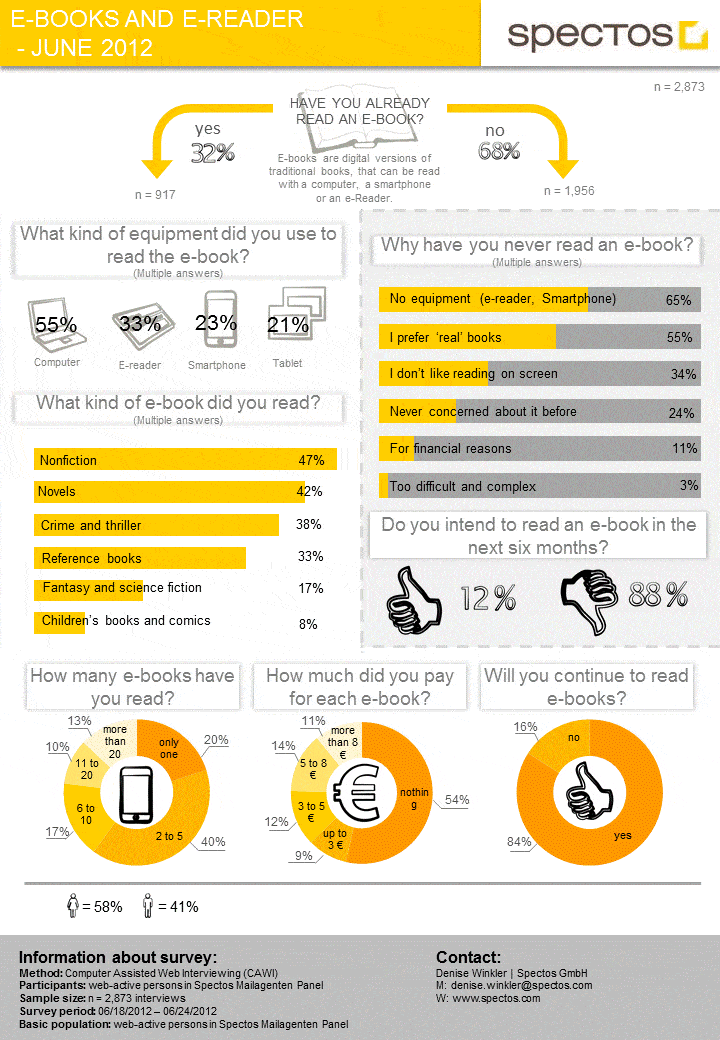
Here are a couple of infographics for your review, courtesy of The Digital Reader:

(It would be interesting to know more about the demographics of this survey conducted by spectos.com.)


This infographic uses data from Pew, businesstocommunity.com and Gizmodo.


Pinterest is the mother lode of infographics, of course. Here's my favorite board:

(53 pins as of this writing)

As with all infographics, be sure to read the fine print at the bottom to determine the authoritativeness of the data source(s).

◊ ◊ ◊ ◊ ◊

3. Monitor up-to-the-minute developments and trends via blogs and Twitter.

I recommend adding these sites/blogs to your reader (I use Google Reader);

Pew Internet Libraries
Publishers Weekly's digital content and ebooks section
The Digital Reader
ereadingtrends
Digital Book World
Personanondata
Publishing Trends
The digital publishing section of goodereader.com
Publishing Perspectives

If you're a Twitter user, I've created a short Digital Publishing list. I invite you to subscribe.

◊ ◊ ◊ ◊ ◊

4. If you're interested in how ereading affects libraries, follow these three great resources.

No Shelf Required
eBooks, eReaders, and Libraries on scoop.it, curated by Buffy J. Hamilton
The Digital Shift (Library Journal, School Library Journal)

◊ ◊ ◊ ◊ ◊

And there you have it, four ways to keep up with what's happening with ereaders! This is by no means a comprehensive list. Please comment below if you have suggestions.

To my dear author friend who asked me to do some investigative work on ereaders, I hope this helps! The state of the digital publishing industry is a subject in which I'm keenly interested. I learned a lot writing this article!

Happy reading!

(◕‿◕✿)
@mauilibrarian2

(Cross-posted in my SEABURY READS blog)

Five Take-Aways from the Google Teacher Academy


Yes, of course there are more than five things I took away from the Google Teacher Academy!

This little list is just a pupu* to start.

1. Let's jump right to the Grand Prize (yes, I sometimes do eat dessert first!). The email invitation at the end of the training to become a member of the very active Google Certified Teachers Group assures me that the awesome learning I experienced at the Google Teacher Academy will continue. I've already consulted the archives a couple of times to answer Google-related questions, and the word is that group members are quick to respond to questions. I've elected to subscribe to the daily digest, and I definitely will be tapping into this mother lode of knowledge often.

2. I discovered that the Chrome Web Store is jammed packed with useful apps and extensions to automate tasks.

A couple of free extensions mentioned by Sean Beavers and Eric Curts grabbed my attention:

Awesome Screenshot,  to "capture the whole page or any portion, annotate it with rectangles, circles, arrows, lines and text, one-click upload to share."

Anesidora, still in beta, is an unofficial Pandora player that you can play right in your Chrome browser.

I'll be shopping for free web apps and extensions at the Chrome Web Store often.

3. I found out that Google Docs Integration with Edmodo (often called Facebook for Education) has been available since March. This opens up exciting collaboration and networking possibilities that I'd like to explore, for our Google Apps for Education (GAFE) school. (One of our teachers had expressed interest in trying Edmodo, before the Academy.)

Fellow GCT, New York librarian Brendan Breen, has had experience with Edmodo, and he offered to help me set up an experimental Edmodo group, using Google+ Hangouts. Thank you, Brendan!

4 of the 5 school librarians at GTA

4. The Data Liberation Front site is a central location for information on how to move your data in and out of Google products.

How cool is it that I found out about this site at the Academy? Love the transparency.

5. I was blown away by the in-person presentation by Kern Kelly's students of Nokomis Regional High in Central Maine. Their Tech Sherpa group has just started a live online technical support program that's available for the world every Tuesday at 3:00 EST. So inspiring!


Yes, there's more ... stay tuned!


(◕‿◕✿) @mauilibrarian2


*appetizer, in Hawaiian