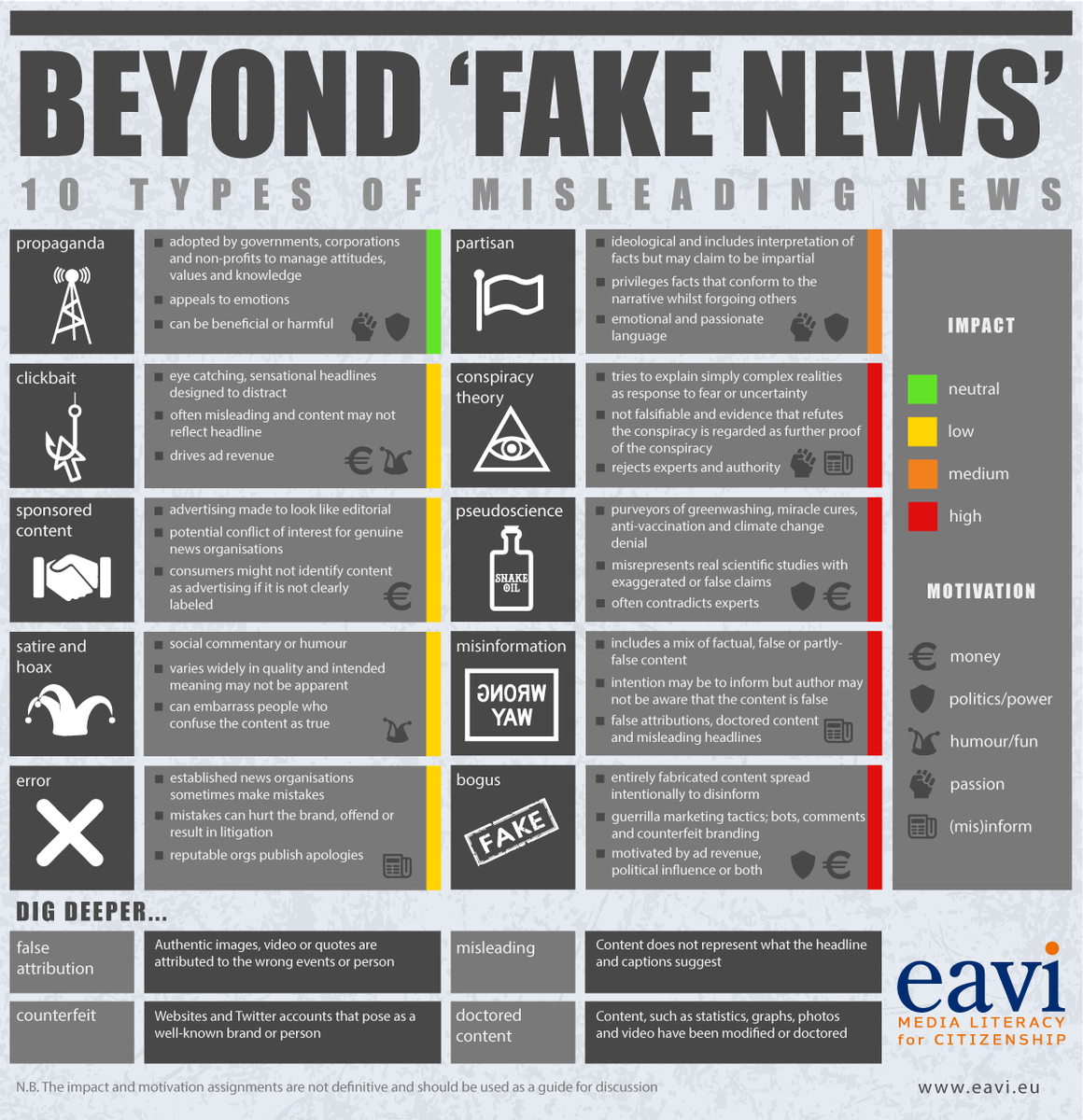
A post shared by Linda Lindsay (@mauilibrarian2) on
Discovered this fabulous feature as I was tallying my mileage for our Middle School Cooking Winterim* experience this week.
Simply type in your Google search:
Distance between (address or business name) and (destination),
and voilà:
Just for fun, I took it a bit further, and discovered that this works for distances in mere feet too, like how far is it from my house to the house across the street, for instance (FYI 36 feet). Isn't that the coolest? 😎
I think this would make a fun prompt in math class, to launch problems with individuated solutions.
*"Winterim is designed to expand the Seabury Hall program beyond the classroom through a variety of offerings with an experiential approach to learning. Winterim provides students with the opportunity to work in groups composed of representatives from each grade level. The multi-age experience allows our community to become closer, form friendships with students from other grade levels and enhance understanding, appreciation and support for each other, our community and our unique Maui culture." -- school website
Google Rocks! Hawaii will be back on January 25, after a nine-month hiatus, with Show #86!
We will be airing monthly during the school year, on various educational topics, and always with something Google-rific in the mix.
Starting us off will be some special EdTech Team guests, who will get us pumped for the HAWAII SUMMIT, featuring Google for Education. The Summit will be held on March 25-26 at the University of Hawaii at Manoa. You can register right on the Summit page, on the upper right.
Simply click on the above YouTube video at 7pm HST on January 25 to view the show. During the broadcast, you'll be able to ask questions in the Live Chat to the right (something new, so cool!).
The new Google Sites arrived for everyone in November (Finally!). And according to many early adopters, Sites is a cinch to use.
First, of all, if you're still pondering a transfer to the new Google Sites, check out Mike Reading's comprehensive article comparing the classic Sites to the new:
The new Google Sites, with 🎉 drag-and-drop and 🎉 real-time co-editing, is looking simple for the moment (just a few themes to choose from), but things are guaranteed to change, ala Google's MO. Luckily, my favorite feature is already in place: 🎉 seamless integration with other GSuite products. And a must-have feature? 🎉 automatic optimization of Sites for different devices.
(One drawback is that you can't move your classic site over to the new.)
For those who would like a little assistance with visuals (always pausable) and a friendly, authoritative voice, try the video tutorials below, created by excellent trainers I personally trust.
The video tutorials are in reverse chronological order. I will add more I recommend, as they become available. Grab a cup of your favorite beverage for the shorter tutorials, or linger with a second cup for the longer tutorials: your choice!
•The All New Google Sites for Schools - Video Tutorial. Eric Curts. Control Alt Achieve. Article, with resources. Dec. 15, 2016. [Length: 1:16:23]
•EdTechTeam Live: Google Sites Demo and Q and A. Emily Fitzpatrick, Director of Professional Development. EdTech Team, Nov. 21, 2016. [Length: 31:41]
•NEW Google Sites 2016 for Educators. Flipped Classroom Tutorials, Nov. 20, 2016. [Length: 8:31]
I selected some pre-release tutorials, created by experienced trainers who had a sneak peak of Google Sites, out in Beta in June:
•The NEW Google Sites - 2016 Tutorial. Technology for Teachers and Students, Aug. 22, 2016. [Length: 17:58]
•How to use the New Google Sites - Tutorial 2016. Jamie Keet. Teacher's Tech, June 24, 2016. [Length: 16:03]
IMPORTANT NOTE: This ongoing post of recommended reading and resources for teachers will continue to be vetted according to the code of ethics for excellent journalism and the celebration of a totally free press as protected by the First Amendment. I highly recommend bookmarking All Sides ("think for yourself") for an ongoing overall view of controversial issues, from the left, center, and right.
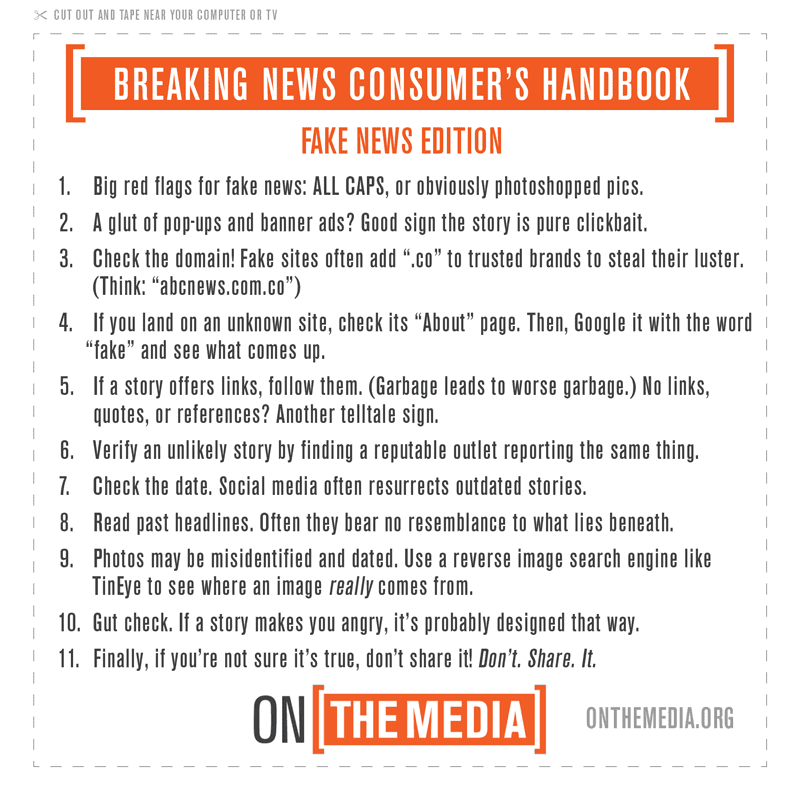
•Breaking News Consumer's Handbook: Fake News Edition. On the Media, Nov. 18, 2016. Interview with Melissa Zimbar, assistant professor of communication and media at Merrimack College, who has "made a list of more than a hundred problematic news sites, along with tips for sorting the truthful from the troublesome. She talks... about how to be a savvy news consumer in a misinformation-filled world."
Listen:
Cut out and post in your classroom: •Lesson Idea: Media Literacy and Fake News. C-Span Classroom, Dec. 27, 2016. Handout and video clips, including the one below.
•To Test Your Fake News Judgment, Play This Game. NPR, July 3, 2017. Game: Facticious by JoLT (Innovation in Journalism Through Game Design) and AU Game Lab (American University).
•The Future of Fake News. Erin Wilkey Oh. Edutopia, Dec. 12, 2017. "New audio and video software will make media manipulations harder to detect. These essential media literacy questions can help."
Keep fighting, with some trusted sources •FactCheck.org. "A Project of The Annenberg Public Policy Center" •On the Media. "WNYC’s weekly investigation into how the media shapes our world view. " WNYC. •Media Literacy. "Find and share resources to help students learn to analyze, evaluate, and communicate in a world with countless media sources and constant access to powerful computers." Edutopia. •The News Literacy Project. "... equips students with the tools to be smart, active consumers of news and information and engaged, informed citizens." •Common Sense Media. •Digital Resource Center. Center for News Literacy. •The Trust Project. Markkula Center for Applied Ethics. Santa Clara University. •AllSides. "Balanced news. News and issues from multiple perspectives, respectful dialog." Search the topics and issues HERE. AllSides Dictionary: "A human look at hot-button terms from every perspective" HERE. •Poynter. Collects all of the International Fact-Checking Network's fact-checking articles. •medialiteracynow.org. Classroom "materials and curriculum available online or to order." Online Guides, courtesy of the LibGuides (Librarian Authors) research community
•Fact Checking, Verification, and Fake News. Lloyd Sealy Library, John Jay College of Criminal Justice, The City University of New York. •Fake News, Misinformation, and Propaganda. Harvard University. •Fake News. Indiana University East. •Fact or Fiction? How to Tell. Seabury Hall (us :D) •Search the LibGuides Community yourself. •Fake News. Fordham University. •Fake News. University of Washington. •Portland State University Library LibGuide: Identify and Challenge Fake News. Worth a second mention Truth, truthiness, triangulation: A news literacy toolkit for a "post-truth" world. Joyce Valenza, Assistant Professor of Teaching at Rutgers University School of Information and Communication. School Library Journal, Nov. 26, 2016. A gold mine of resources, some of which are mentioned in this post. If you read only one article from this post, choose this one! Will you be tackling fake news and teaching media literacy at your school too? Let me know how it goes!
◊ ◊ ◊ ◊ ◊
P. S. I posted this news sources chart created by patent attorney Vanessa Otero in our library. We like it a lot, and we're using it as a starting point for discussion about the trustworthiness of news sources in general.