What is the one Must-Read Nonfiction for High School Seniors title that pops into your head?


Emboldened by the interesting responses to my plea on Facebook for Must-Read Nonfiction titles for high school seniors, I'm going LARGE to reach my G+ and Twitter supporters. :)

Won't you weigh in with the one Must-Read Nonfiction for High School Seniors title that pops into your head?

Here are the Facebook comments so far. You should be able to add a comment, since the post is public.


Aren't the responses eye-opening? I'll definitely be purchasing the titles we don't already have.

If you don't have a Facebook account or you would rather recommend privately, you can use the Google form below.


OR, you can leave a must-read title on Twitter. Simply add my Twitter handle @mauililbrarian2 to your post.

Thanks in advance for your input. Our Seniors will appreciate it very much!


(◕‿◕✿)

Cross-posted to SEABURY READS.

Happy Blogging! My Top 5 Blog Posts of 2014 and My Favorite 6


Inspired by Alice Keeler's Top 10 Blog Posts of 2014 ( I HIGHLY recommend you add her to your MVP list!), I decided to create a list too.

These posts had the most traffic in 2014:

1. "What is the Mindset of a Maker Educator?" Resources Mentioned in Edcamp Online, Oct 25

2. 1112 Great GOOGLE CLASSROOM Tutorials by Early Access Testers, July 25

3. 10 Popular Pinterest Boards for End-of-the-Year Classroom Activity Ideas, May 5

4. 5 Tech Tools, Innumerable Possibilities -- from the Hawaii #GafeSummit, Mar 29

5. 12 16 Resource Sites for Teaching and Learning With the 2014 Winter Olympics in Sochi, Jan 25

Judging from this list, readers found my curation posts the most useful, so-o-o-o, I will be writing more about my finds in 2015!

My 6 personal favorites are:

1. Our Library's Sixth Annual Keiki Christmas Storytelling Hour -- A Winter Wonderland of Fun!, Dec 24 ( FUN! )

2. How to Password Protect a Google Form -- a Quick-Start Visual for Download, Dec 6 ( So useful! )

3. How to Schedule Appointments with Google Forms Add-On Choice Eliminator, A Tutorial by Sean Junkins, Oct 25 ( Useful as well! )

4. 4 Things I Learned from Maui's First Student-Led TEDxYouth Event, Apr 30 ( Heartfelt! )

5. 5 Tech Tools, Innumerable Possibilities -- from the Hawaii #GafeSummit, Mar 29 ( Fantastic event! )

6. For #WRAD14, A Hangout with Matthew Winner & A Student Who Didn't Learn to Read Until She Was 10, Feb 26 ( Two inspiring human beings! )


I love to learn and share (me and a million other educators)! And I've found blogging to be just the ticket -- for myself, and for others who drop in to visit my blog ( Thank you! ).

If you're thinking of blogging, JUST START!

Happy blogging!


(◕‿◕✿)

Yes, there are quite a few exclamation marks in this post. It's an exclamation mark k!nd of day! ☺

Our Library's Sixth Annual Keiki Christmas Storytelling Hour -- A Winter Wonderland of Fun!


My little group of student readers selected a Winter Wonderland theme for our library's sixth annual Keiki* Christmas Storytelling Hour, the last stop for the children at the Alumni Keiki Christmas Party.

Oh what fun it was! ☃

4 student readers and the librarian, with some of 
the student-made snowflakes in the background.

Aria reads The Polar Express. The keiki participated  
with silver bells they could take home with them. "Believe."

Faculty and staff keiki ♡

Group photo. Check out the scarves. Brrrr! ❄

Afterwards, a spontaneous mom-read of Winnie the Pooh's 
The Merry Christmas Mystery, with grandma looking on.

Mahalo to Aria, Sean, Mikhaila, and Patricia, for making the event extra special!

Merry Christmas, everyone!

(◕‿◕✿)


*Keiki = children

Cross-posted to SEABURY READS.


Our Third Pop-Up Maker Event at Our Library -- Christmas Gifts and Snowflakes!


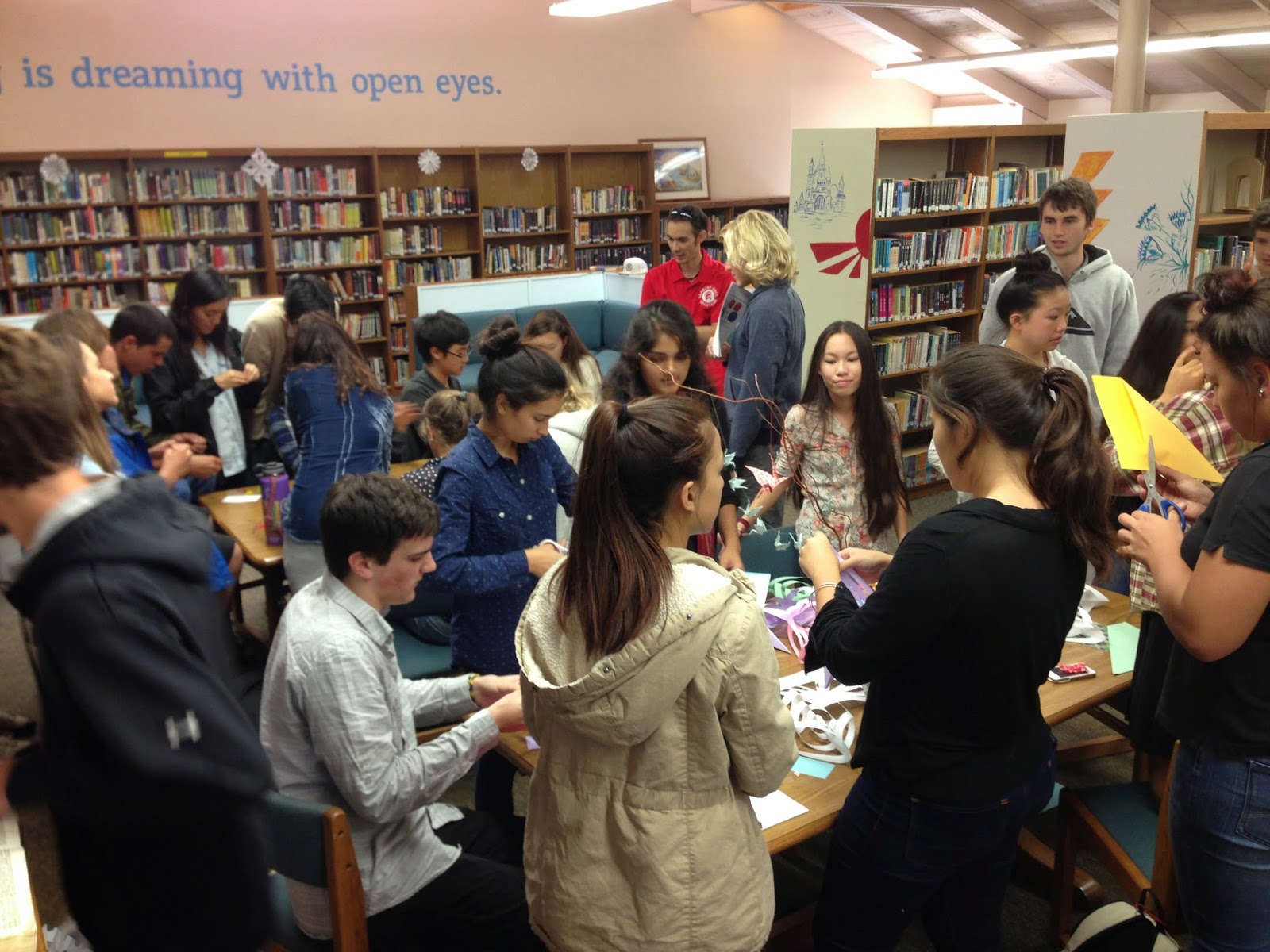
Our library's third pop-up Maker event, this time with a Christmas theme, was a HIT!


Lauralei and Corin (both in black) taught students how to make 
loom bands to give as Christmas gifts.


Jasmine showed students how to make snowflakes, and Darby cranes.

The library was abuzz -- three student advisories dropped in after lunch :)

I went for a large and bright snowflake, and 
Phoebe went for a multi-colored and dainty one.

Thomas poses with Kyleigh and her jungle-print origami paper snowflake.


Mahalo to Darby, Corin, Jasmine, and Lauralei (and Jessica and Angela) for being so willing to share their maker skills with their peers.


◊ ◊ ◊ ◊ ◊

The snowflake contest was an add-on that kind of just evolved.

Students who were helping me plan our Annual Keiki Christmas Storytelling Hour (blog post to follow about this event) chose to decorate the library with a Winter Wonderland theme. So the snowflakes were a natural.


Snowflakes were to be made in the library, from recycled library paper.

Snowflakes popped up everywhere! What a Wonderful Winterland sight!

Two student artists judged the entries. Here are the winners of the competition:

Upper School First Place - Sancia

Upper School Second Place - Sophia

Upper School Third place - Lily

Middle School winner - Aryana

Kudos to everyone who made a snowflake. The variety was quite amazing, and all the creations were so beautiful.

◊ ◊ ◊ ◊ ◊

This Christmas Maker event was just the thing for students who needed a break from studying for finals, I think.

What will be our next pop-up Maker event? Stay tuned!

My goal this year is to celebrate the student makers in our community, and I'm already thinking that there are enough makers in our community to go on indefinitely. There is so much talent among us, and our students are very willing to share. How lucky are we?

Everyone is a Maker ...

(◕‿◕✿)


3 More Things to Share about our Hour of Code Week -- A Project, a Challenge, and a Presentation


I have three more things to share about our grassroots Hour of Code Week at our school.


1. A project. Mr. Van Amburgh's Stagecraft class did a full-on coding project this week. Here are comments made by some of the students about the tutorials:

"The app that I played was the angry birds one, Due to the blocks, the game was simple and fun. Although coding might not be as simple and fun, trying it for the first time in a way like that is very good for a beginner, such as myself. I had so much fun I played multiple rounds on the angry birds app, and even tried a couple others, like coding combat, coding combat was more fun probably because it was easier to just type in what you wanted your character to do. I also played Isaiah's game, Ping Pong madness, the game was simple and fun, and for his first time ever making a game, I give him a 5 out of 5 stars. (Right now I am the current record holder with 55 bounces without drops.)" -- Ethan 

"The apps that I had played were the angry birds app and the coding combat ones. They were fun and simple to understand. I had played two rounds in the coding combat app because I just love vikings so much and I had played multiple rounds on the angry birds app. I had found that the coding combat was more fun probably because it was a bit easier to just type in what you wanted the character to do than to drag over the box that said what the player was going to do. I had just kinda figured out how to do the coding from the doing what the game asked me to do." -- Erika

"The app I tried was called touch develop. Its system was basic and easy enough to follow, even for someone abhorrently bad with technology like myself. It taught me about java script programming by having me make a little animation. The app was informative but not very interesting. I would have liked it better if there had been more of a focus on problem solving instead of procedures that had to be followed to the dot. Because programming is a science that requires exact calibration, I have never been that interested in it. If there more freedom for variation it mite be more appealing to me." -- Ari

"Using the angry birds and bad pig tutorial, I was able to code the program so that the bird would quickly find the pig. It was extremely simple thanks to the blocks, but I had to watch the video in order to figure it out. Having never done any coding this was all very new to me. Although the beginner tutorial was easy and fun, I can definitely see how complex this process can become when I look at the actual code. It reminded me of the block puzzle I used to play on my iPod, where you have to get the red block pass the other blocks that can only move in one plane. The problem solving element is the basis of both and keeps me guessing how to make the solution the shortest." -- Sarah

"I experimented with scratch. It was pretty fun, with many interesting things, like the box style. It simulated programming with scripts, but much simpler. The only thing I did not like about it was that it was very hard to do simple things, like make the screen scroll with the character. It also took a lot of experimenting for the use of variables, which was pretty fun yet challenging to figure out." -- Noah

I really liked the program I used. I picked the game called Code Combat, which is basically like a medieval RPG where you go through each level trying to collect gems and even get to fight monsters. I liked it so much that I actually made a free account so that I could save my progress! It was surprisingly easy to do coding, all you have to do is type commands for your character to do on the sidebar and then click "run" for the character to do them. It's a really cool and fun way to learn the basics of coding. -- Jessica

"I liked the tutorial, and it was really fun to try. I've tried to do coding before, but it always failed. The blocks definitely make it easier to program a game/movement/action; they were less confusing, since they weren't made up of numbers, letters, and punctuation symbols I didn't understand. Although some parts were a bit odd, it got less confusing after a few tries. :)" -- Lauren

"I had fun with the tutorial of the program. Then I made a ping pong game by myself and it actually turned out ok. The process is difficult but if you do it enough it becomes habit. I would recommend trying multiple game styles to learn how to make a game. I want all of you to try my game out but I don't know how you can find it." -- Isaiah

2. A Challenge. Jesse Doan of the AP Computer Programming Class issued a challenge to all Seabury students to break his Cooney code:


Can you figure out "What Cooney Likes"? :)

3. A Presentation. Our week ended with a last-minute, very informative lunchtime presentation by some of our AP Computer Programming students.

Relaxing for a photo, after the presentation -- presenters and attendees
Not a bad turnout considering the late notice and the competition (Cooking decorating and Christmas caroling in the dining hall. :D )

Computer teacher Mrs. Hodara is hoping that some of the attendees will sign up for AP Computer Programming class next year!

◊ ◊ ◊ ◊ ◊

P. S. The winners of the Hour of Code participation drawing ....?


... will be announced tomorrow in school. 

Thanks to everyone who participated in the Hour of Code this year! We will plan earlier next year, for an even better celebration.

Keep on coding!

(◕‿◕✿)